














 Back to M22-เครื่องพิมพ์ อิงค์เจ็ท (Inkjet Printer)
Description
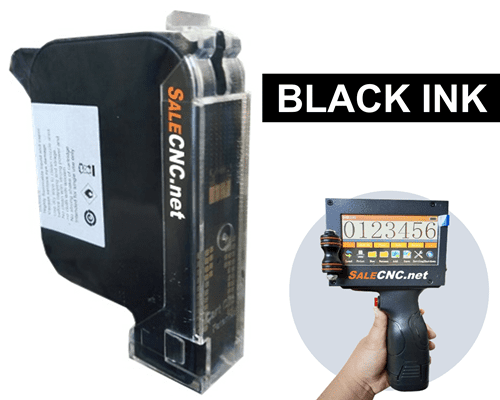
Black Ink Cartridge, Code 2588+(G)
For Handheld Inkjet Printer G-850

- Black ink, code 2588+(G), for Handheld Inkjet Printer G-850.
- Capable of printing at a character height of 3 mm. Prints up to 1,000,000 characters per cartridge.
- Price per ink cartridge: 3,900 THB.
- For more details, click here.


Spray Marking Label Machine
Date and Expiration Date Printer (Handheld Inkjet Printer)

Capable of printing on various materials such as wood, fruits, electrical cables, cans, plastics, metals, and more.
Property: Features of the Date and Expiration Date Printer
- High quality Ink cartridge.
- No need to connect to a computer to edit content directly.
- Easy and fast text input with a single key.
- Supports external photoelectric sensors for improved efficiency.
- Import graphics via USB drive.
- Intuitive touchscreen operation.
Printing text on water bottles using the Belt System + Sensor Handheld Inkjet Printer
Printing text on steel and stainless steel boxes using the Handheld Inkjet Printer
Using a plate block to guide printing distance with the Handheld Inkjet Printer
Printing on curved clear bottles with non-fading ink.
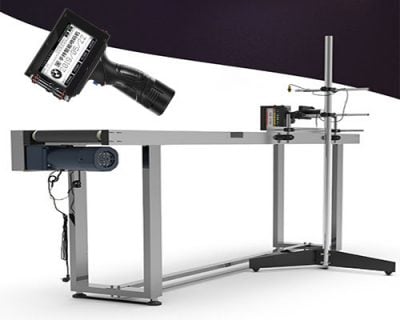
Belt System + Sensor + Stand for Handheld Inkjet Printer
Machine characteristics: External View


✔ Machine Dimensions (Open)
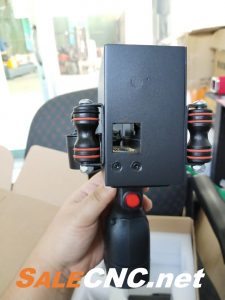


✔ Overall Views
Specification: Machine Specifications
| Print Head | Heated Print Head |
|---|---|
| Printable Materials | Wood, Paper, Stone, MDF, Cable Trays, Metal, Metal Pipes, Plastics, Aluminum, etc. |
| Print Resolution | 600 DPI |
| Printable Content | English/Chinese Characters, Numbers, Barcodes, Images, Time, and Date |
| Supported Languages | English, Chinese |
| Automatic Printing Formats | Date (Y/M/D), Time, Serial Number, etc. (Customizable) |
| Print Colors | Black, White, Red, Blue, Yellow, Green (Dependent on ink cartridge) |
| Character Height | 2mm – 13mm |
| Printing Distance | 2mm – 10mm (Optimal 2-5mm from nozzle to surface) |
| External Interfaces | USB, Photoelectric Interface |
Machine components

Handheld Inkjet Printer 1 Set


✔ 1 x Date and Expiration Date Printer


✔ Rechargeable battery.
✔ 1 x Black ink cartridge.

✔ Powered by AC 220V household electricity.
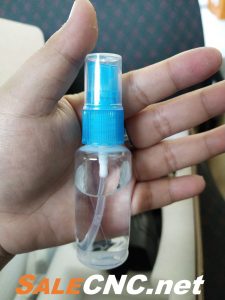
✔ Cleaning spray for the machine.
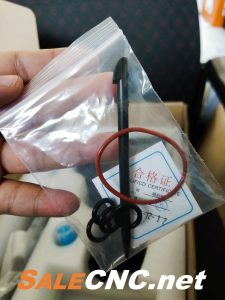
✔ Touch pen.

✔ Metal guide plate for printing.
600DPI High Resolution Nozzle

- Matching 600-line/increment photoelectric rotary encoder. High-resolution 600DPI nozzle.
- Accurately restores image effects.
- Utilizes anti-clogging nozzle technology.
- Character height range: 2mm – 12.7mm.
*** Attention: Do not remove the metal sticker on the bottom of the ink cartridge, as this may cause the cartridge to malfunction. ***
Product Size
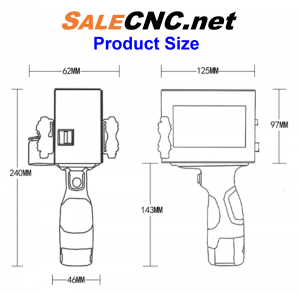
Comparative Information (New vs. Old Models)
4.3-inch High-Definition Large Screen

- Large screen touchscreen control provides more convenient operation and clearer display.
- Eliminates concerns about small screens, repeated editing, and errors.
New Model
- 4.3-inch large screen, clear touchscreen, and easy operation.
Old Model
- Small screen with monochrome display.
Battery

- Detachable charging, safe, and charges in only 2 hours.
- High-capacity battery.
- Long standby time.
- Enables long-term continuous operation.
- Reduces the need for frequent charging.
New Model
- Original battery offers greater stability: Huangyuan original battery – Longer battery life.
Old Model
- Other brand batteries – Lower battery stability.
Application


Optional Features for Date and Expiration Date Printer (More Options)
🟠 Conveyor + Sensor + Tall Holder
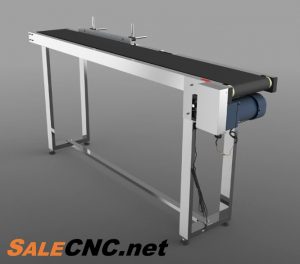


- Stainless Steel Conveyor, 1500mm (1.5m) length and 70cm height.
- Adjustable speed (Conveyor with adjustable speed).
- Conveyor + Sensor + Tall Holder available for an additional 19,900 THB.
🟠 Ink: Ink Cartridge
- Black ink, code 2588+(G), for Handheld Inkjet Printer G-850.
- Capable of printing at a character height of 3 mm. Prints up to 1,000,000 characters per cartridge.
- Price per ink cartridge: 3,900 THB.
- For more details, click here.
Video Tutorials
1. Introduction to Inkjet Handheld Printer Components
2. Assembling the Inkjet Handheld Printer
3. Using the Inkjet Handheld Printer – Part 1
4. Using the Inkjet Handheld Printer – Part 2
5. Using Block Guides for Inkjet Handheld Printing
6. Designing Files on Computer for Inkjet Handheld Printing
7. Printing Logo & Image Files with Inkjet Handheld
8. Storing the Inkjet Handheld Printer After Use
Language Switching Procedure
สนใจหรือติดต่อสอบถาม โทร
082-972-9329 (จิมมี่)
083-256-5981 (โกมินทร์)
E-mail : [email protected]

 salecnc.net
 salecnc.net


